Navier CFD turns a three-week outsourced study into a few hours. Upload your geometry, describe what you need, and get validated results back fast.
Most teams can't justify a full-time CFD hire. The work is too specialized, too intermittent, and too expensive to keep someone on staff year-round. A good CFD engineer costs six figures, needs solver licenses, and needs HPC infrastructure to be productive. For teams running a handful of studies a quarter, the math doesn't work. Simulations get skipped, and expensive problems surface downstream.
So teams outsource. They source a contractor, write a brief, negotiate scope, and wait. One to three weeks per study is typical, with timelines stretching longer if revisions are needed. Along the way, visibility into the actual engineering decisions, mesh topology, turbulence model, boundary condition treatment, and refinement strategy often gets lost. You see the results but not the reasoning. When something looks off, the clock resets and you're back in the queue.
Navier CFD collapses that loop. Hours, not weeks. Full visibility into every decision the agent makes.
How It Works
The workflow is built around three ideas: describe the problem in plain language, let agents handle the setup and post-processing, and keep an expert in the loop before any compute runs.
Describe and upload. Tell the Navier CFD agent what you're analyzing. Flow conditions, quantities of interest, constraints, whatever the engineering question is. Drag in your geometry file (we accept both STEP and STL files) and type your question. The interface is built for engineers who know what they want to learn from a simulation, not for specialists who spend their day inside a preprocessor.
Agent configure the run. Navier's agent drafts the mesh, sets boundary conditions, selects turbulence models, and configures the solver. It reads the geometry, interprets the problem description, and makes the same setup decisions an experienced CFD engineer would make. Refinement near walls and wake regions, y+ targets appropriate to the wall treatment, solver schemes chosen for the flow regime, convergence criteria tied to the quantities of interest you specified. What traditionally can take hours of manual setup happens in minutes.
A human reviews every setup. We know the agent won't get everything right every time. That's why before any core-hours are spent, a Navier simulation engineer reviews the mesh and solver configuration. Boundary conditions, turbulence model, refinement strategy, all checked against the problem you described. If something's off, we fix it before it runs. Our review team includes a former NASA CFD engineer from the X-59 QueSST program and a former F1 and Tesla aerodynamicist. These are people who have spent their careers catching the subtle errors that cost real programs real money.
The result is that you get the speed of automation with the reliability of expert oversight, and you don't ever pay for compute on a run that was set up wrong.
Results in Context
When a run finishes, all the results land in one place. 3D flow field visualization, convergence history, residual plots, the full solver configuration, and an engineering report are all accessible inside the Navier web platform. No downloading case files, no spinning up ParaView, no hunting through log files to figure out whether the run actually converged.
The engineering report covers what you'd expect from a contractor deliverable. Setup assumptions, mesh statistics, boundary conditions, solver settings, key results tied back to your original questions, and caveats where they apply. It's the document you'd hand to a reviewer or drop into a design review package.
On top of that, you can ask the agent questions about the results directly in context. Why is the separation happening where it is? What's driving the pressure recovery on the aft section? How sensitive is the drag coefficient to the turbulence model choice? The agent has the full case loaded and can reason about it without you having to re-explain the problem.
What Changes for Your Team
Without Navier, a typical external aero or internal flow study means sourcing a contractor, briefing them, waiting one to three weeks, and hoping the mesh and solver choices were sound. Revisions stretch the timeline further. Design iteration at that cadence is painful.
With Navier CFD, your studies take under four hours for standard cases at moderate mesh density. You upload geometry, describe what you need, and get meshing, simulation, and a report back the same day.
Pricing
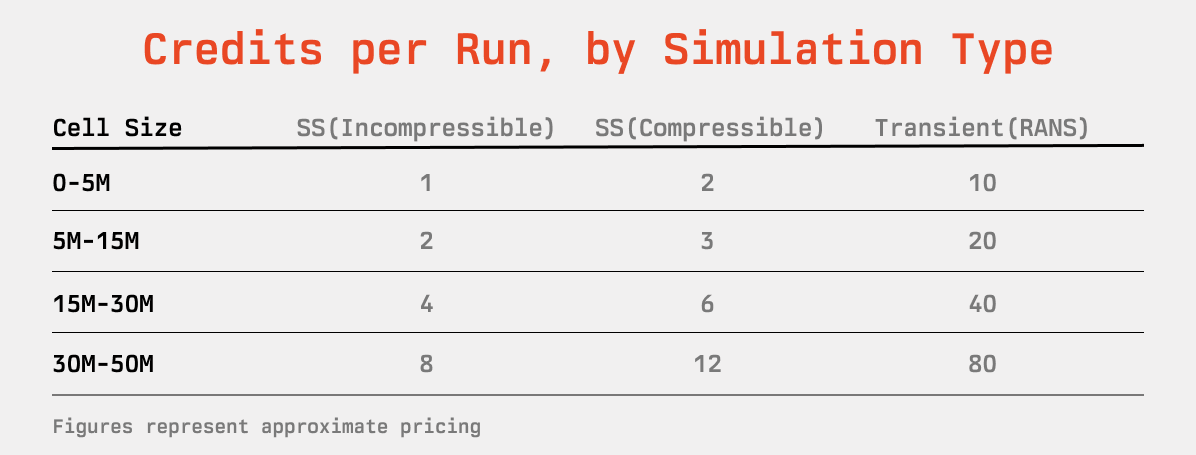
Navier CFD is credit-based, starting at $10 per credit. Pay for the runs you need. No seat licenses, no annual commits, no HPC queue to manage, no solver licenses to negotiate. If you run one only study this quarter, you pay for one study.
Upload a geometry, describe a problem, and get accurate results within hours. Skip the setup and start simulating today.
Start Simulating
with Navier CFD
Upload your geometry, describe what you need, and get validated results in hours.
Get Started →